

Ethernet cables look simple. A plastic jacket, a connector on each end, and you are done. In real networks, that “simple” choice can shape years of costs. The right cable reduces downtime, avoids rework, and keeps upgrades cheaper. The wrong cable creates hidden expenses that show up as slow links, flaky connections, and emergency replacements.
If you manage multiple runs, it can feel smart to buy bulk Ethernet cable once and stop thinking about it. That mindset can pay off, but only when the bulk spool matches the job. Cable category, conductor type, jacket rating, and installation quality all decide if that purchase stays a win or turns into a redo.
The Real Cost of “Cheap” Cables: Downtime, Rework, and Lost Productivity
The price tag on a patch cord rarely reflects the full cost. A cable that fails intermittently can eat hours. Techs chase “random” disconnects, users reboot devices, and teams blame switches or routers. That labor adds up quickly, especially when the issue hides behind walls or above ceilings.
Rework costs hit harder than the first install. Pulling cable a second time means new materials plus access time, lift rentals, ceiling tiles, conduit re-entry, and disruption to the space. In offices, that disruption becomes a productivity cost. In retail, it turns into slower checkouts and customer frustration. In a home, it becomes weekends lost to troubleshooting.
Cheap cable can also trigger early upgrades. A run that barely meets today’s needs limits tomorrow’s changes. When you add Wi-Fi access points, cameras, or higher-speed switches, you may find that the “bargain” cable forces a full refresh.
Match Cable Category to Your Actual Network Plan
Category ratings are not marketing fluff. They describe performance capabilities like bandwidth and supported speeds over distance. If you choose too low, you limit your network and risk replacing the cable sooner. If you overshoot, you can spend more without getting real value.
For many homes and small offices, Cat6 offers a strong balance. It supports gigabit networks comfortably and can handle higher speeds on shorter runs when conditions are right. Cat6a often makes sense in new builds, PoE-heavy spaces, and places that plan for higher-speed uplinks. It costs more, but it can delay a bigger upgrade later. Cat5e can still serve basic gigabit needs, yet it leaves less margin for noise and growth.
Your plan matters more than a chart. Think in practical terms. How long are the runs? How many devices will sit on that wiring in two to five years? Will you add more access points, cameras, or a NAS? A slightly higher category now can save the cost of opening walls later.
Avoid False Savings: Copper-Clad Aluminum, Wire Gauge, and Build Quality
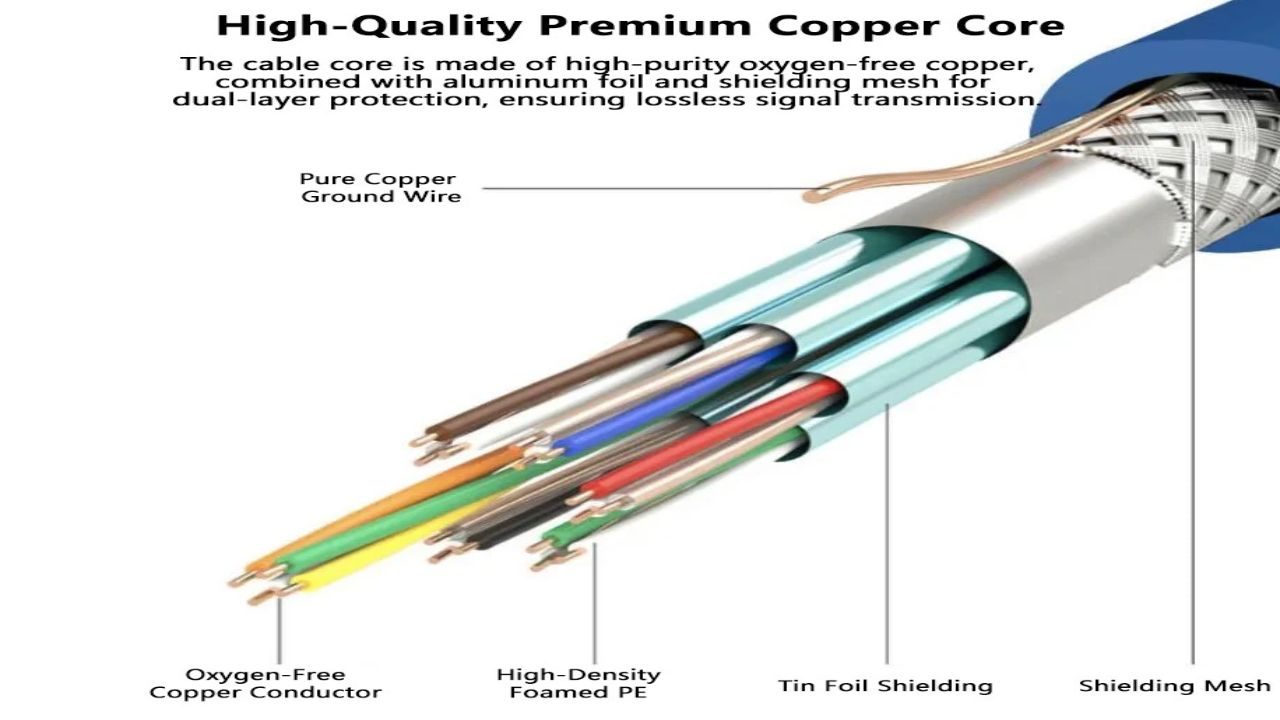
Not all “copper” cables are the same. Some low-cost options use copper-clad aluminum (CCA). They can work in light-duty situations, but they often bring higher resistance than solid copper. That can cause a voltage drop in Power over Ethernet setups and reduce signal integrity on longer runs. The result can look like random device resets, underpowered cameras, or access points that behave unpredictably.
Wire gauge matters too. Thicker conductors generally reduce resistance, which helps with PoE loads and longer distances. You do not need to memorize every gauge, but you should treat ultra-thin cables as a warning sign for permanent runs. For patch cords, flexibility can matter, yet the build still needs reliable connectors and consistent twist rates.
Connector quality also affects long-term costs. Poorly terminated ends lead to loose contacts, bent pins, and intermittent link negotiation. A cable that “works” at 1 Gbps today might fail to negotiate cleanly after a few months of movement or temperature shifts. Paying a bit more for solid copper and reputable manufacturing often costs less than repeated replacements.
Pick the Right Jacket and Rating For the Installation Environment
Many cable failures come from the outside, not the copper. Heat, UV exposure, moisture, oils, and abrasion all attack the jacket over time. If you run cable outdoors, across a roofline, or along an exterior wall, standard indoor jackets can crack and degrade. That invites water intrusion and corrosion. Outdoor-rated cable costs more upfront, but it prevents the slow failure that forces a full replacement run.
In-wall and plenum spaces need special attention. Local building codes often require specific fire ratings for cable jackets. Using the wrong rating can create safety issues and expensive remediation. Even when inspectors never get involved, the wrong jacket can break down in hot ceiling cavities and become brittle.
Also, think about physical protection. Conduit, raceways, and proper strain relief reduce future damage. A cable that lasts ten years because it is protected costs less than a cable you replace every two years because it gets pinched, kinked, or stepped on.
PoE, Cameras, and Wi-Fi: Where Better Cable Cuts Future Hardware Spending

Power over Ethernet has changed cabling economics. One cable can carry data and power to cameras, VoIP phones, door controllers, and access points. That convenience can save money, but it raises the stakes on cable choice. Higher resistance and poor termination can reduce delivered power and cause brownouts. Then teams replace “bad devices” that were never the real problem.
Better cable can also prevent premature hardware upgrades. A modern Wi-Fi access point may need a stronger uplink and stable PoE delivery. If your cabling cannot support the link speed or power class reliably, you may buy a switch you do not truly need, or you may downgrade the access point placement and performance. That becomes an ongoing cost through slower Wi-Fi and more troubleshooting calls.
Planning for PoE loads also helps you avoid overbuilding in the wrong places. If you know you will run cameras and access points, choosing a cable that handles that power cleanly lets you standardize gear and reduce exceptions. Standardization saves money in spares, training, and support time.
Installation Choices That Protect Your Investment
Even excellent cable can fail if you install it poorly. Avoid tight bends. Respect bend radius rules, especially for higher-category cables. Sharp bends and kinks change the internal geometry of the twisted pairs, which can increase crosstalk and lower performance. That leads to slower links or errors that only show up under load.
Pull tension matters too. Yanking cable through studs and conduit can stretch conductors and damage twists. Use pull strings, lubricant when appropriate, and patience. It sounds old-fashioned, but careful pulls cost less than a troubleshooting visit later. Keep cable away from sources of electrical noise, and do not bundle data cable tightly alongside power lines for long distances.
Finally, test and label. A simple certification or at least basic continuity and performance checks can catch bad terminations right away. Labels prevent future “guessing” when you add a device or trace a fault. The upfront time feels tedious. The long-term savings show up every time someone makes a change without tearing apart the whole network.